
Here is my review of the Anker Prime DL7400. I’ve been using this for a couple of weeks, and I have some thoughts. Let’s jump in, shall we?
The hardware
The Anker Prime DL7400 is a lovely bit of hardware, with enough ports to satisfy even the most demanding of users. Made with aluminium and tough plastics, it’s going to look nice on any desk. On the device you will find a litany of ports. As well as a control knob on the side for controlling various aspects of the device.
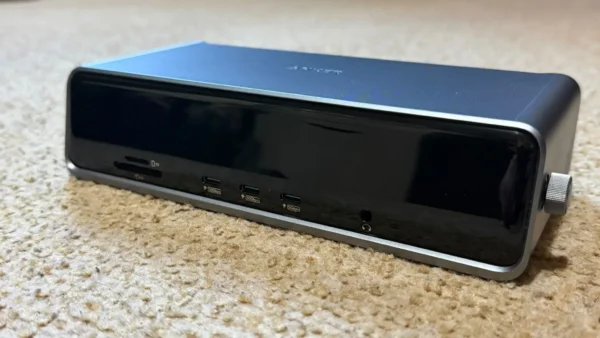
On the front
- 3x USB-C ports, 2 of which are capable of 100w 10gbps, the other 100w 5gbps
- A micro SD card reader and a TF card reader
- 1x 3.5mm headphone jack, which is always nice to see in this day
- There’s also a nice-sized screen, which will show you important information about the dock, allow you to change settings and even show you the time when in standby – neat!
Round the back
- AC-IN (100V-240V 2.5A)
- 1x 140W USB-C upstream port for connecting to your laptop
- 2x HDMI 2.1 ports capable of 8k30 Hz without compression
- 1x Display Port 1.4 port capable of 8K60 Hz
- 2x USB-A 3.2 Gen 1 ports, capable of 5 Gbps data transfer speeds
- 1x USB-A 2.0 port for connecting a keyboard/mouse or even to a KVM, which is the way I used it.
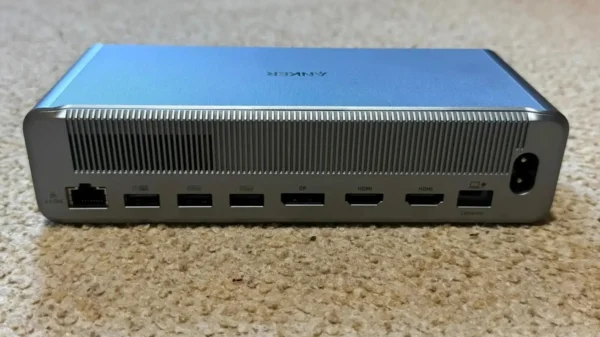
With that many ports, you would imagine the Anker Prime DL7400 can do a lot. You would be correct. It can manage 3x screens at once in various configurations.
| Display Setup | HDMI (Port 1) | HDMI (Port 2) | DP (Port 3) |
| Single Monitor | 4K@60Hz | / | / |
| Single Monitor | / | 4K@60Hz | / |
| Single Monitor | / | / | 8K@60Hz |
| Dual Monitors | 4K@60Hz | 4K@60Hz | / |
| Dual Monitors | 4K@60Hz | / | 8K@60Hz |
| Dual Monitors | / | 4K@60Hz | 8K@60Hz |
| Triple Monitors | 4K@60Hz | 4K@60Hz | 8K@60Hz |
In the above table you can see the available configurations for your use case. It’s pretty much got you covered no matter your setup. Whether you want to use both HDMI ports, 1 HDMI port and a Display Port, or just the Display Port on its own, you’ll find a configuration that works for you.
Usage
In my testing, the ports deliver the speeds they say they do. One caveat is that if you have a downstream cable connected to your laptop, the ports on the front are limited to their PD speeds. Which, from right to left, would be. 25w, 20w and 15w, which is still more than enough to charge a phone or tablet. I’ve been using them to charge my phone while also connected to my MacBook, so no worries there.
The control knob is great for getting at a glance information about what the device is doing. It will tell you the charging speeds you’re currently getting, as well as the display output, resolution and refresh rate for each video port on the back. It also has a fan built in for when things may get a little warm. In my testing I never heard it come on once, so I would guess that’s only needed if you’re a real power user and are using everything on the device.
The negatives
So I had one gripe with the Anker Prime DL7400, and that was the way it handles video output. It requires you to install Display Link software. This is how it gets to the 3-screen output on older MacBooks; from the M5 onwards, they support 3 screens as standard. While testing the Anker Prime DL7400 on my M3 Max MacBook Pro, I noticed some issues using this method. I only had the one screen connected most of the time, but it wasn’t perfect. While it got the full resolution and (sometimes) the full refresh rate, the experience wasn’t great. There was a delay, and almost like a lag effect was present. This showed up in typing and navigating around the OS. I made sure to use high-spec cables in the entire signal chain, and I still experienced this. You may not have these issues, but I thought it only fair to bring them up.
Wrapping up
The Anker Prime DL7400 is a great bit of kit if you can get the most out of it, while a lot of people may not need all the power and ports it has; I’m sure there are people reading that may do. I would just be cautious of the required Display Link software, as it does seem a bit hit or miss.
I give the Anker Prime DL7400 a score of 7 out of 10. While it does deliver as a docking station, I can’t overlook the issues I had with it personally.
Check out Anker’s quick start guide in the video below. Once you have done that, be sure to check out Martin’s review on the Be Quiet! Light Loop IO LCD 360mm. If you want to know more about the Anker Prime DL7400, check out their official website.